


03 December 2021
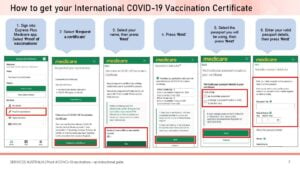
- Sign into Express Plus Medicare app. Select ‘Proof of vaccinations’
- Select ‘Request a certificate’
- Select your name, then press ‘Next’
- Press ‘Next’
- Select the passport you will be using, then press ‘Next’
- Enter your valid passport details, then press ‘Next’
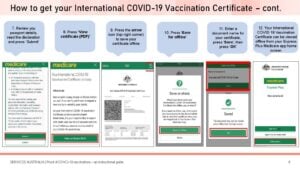
- Review your passport details, read the declaration and press ‘Submit’
- Press ‘View certificate (PDF)’
- Press the arrow icon (top right corner) to save your certificate offline
- Press ‘Save for offline’
- Enter a document name for your certificate, press ‘Save’, then press ‘OK’
- Your International COVID-19 Vaccination Certificate can be viewed offline from your Express Plus Medicare app home screen
How to get proof of your COVID-19 vaccination when you aren’t eligible for Medicare
How to get a paper proof of your COVID-19 vaccination
Step-by-step guide to adding your COVID-19 vaccination certificate to your Service NSW check-in app