


It is a condition of entry for many venues throughout NSW to show proof of your COVID-19 vaccination. If you want to make this simple by keeping a digital copy of your certificate on your check-in app, follow the instruction on this page to:
- Create your online myGov account
- Link Medicare to your myGov account
- Set up proof of vaccination within your myGov account
- Use the Medicare Express Plus app to share your certificate with the Service NSW app
Create your myGov account
Watch the YouTube instruction video (2 min: 14 sec)
The video transcript is available in 12 languages.
Link Medicare to your myGov account
Watch the YouTube instruction video (1 min: 31 sec)
The video transcript is available in 20 languages.
How to get proof of vaccinations through myGov
- Go to my.gov.au
- Sign into your myGov account
- Enter the six-digit code you will receive on the mobile phone number assigned to your myGov account, then press ‘next’
- Ensure you have your Medicare linked to your myGov account, then select ‘Go to Medicare‘ in the Proof of COVID-19 vaccination quick link.
- Select ‘View history‘
- Select the name of the person under ‘Select whose documents you want to view’ then press ‘View immunisation history statement‘ or ‘View COVID-19 digital certificate (PDF)’

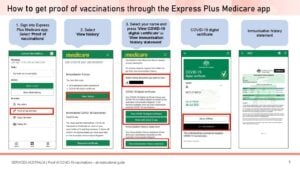
How to get proof of vaccinations through the Express Plus Medicare app
- Install the Express Plus Medicare app (optional installation instructions).


- Sign into Express Plus Medicare app. Select ‘Proof of vaccinations‘
- Select ‘View history‘
- Select your name and press ‘View COVID-19 digital certificate‘ or ‘View immunisation history statement’ (when viewing your COVID-19 digital certificate, you will have the option to save a copy to your phone in Google Pay or Apple Wallet)
How to add your COVID-19 Digital Certificate to your Service NSW check-in app
Firstly, ensure you have the Servie NSW app installed in your phone and create an account (optional installation instructions):


- Sign into your Express Plus Medicare app
- Select ‘Proof of vaccinations’
- Select ‘View history’
- Select ‘Share with check in app’
- Choose Service NSW and press ‘Share’
- Read the Terms and Conditions page, then press ‘Agree and share’
- A warning message will appear advising you will be leaving the Express Plus Medicare app, press ‘OK’
- Follow the prompts provided through your state check-in app. Visit the Service NSW wbesite for more information.
How to get proof of your COVID-19 vaccination when you aren’t eligible for Medicare
How to get your international COVID-19 Vaccination Certificate
How to get a paper proof of your COVID-19 vaccination
Proof of your COVID-19 vaccinations explainer | YouTube
Website: Services Australia | COVID-19 digital certificate as proof