21 October 2021

What is the new POLAR enhancement?

Outcome Health has developed a new function of assigning roles and setting role-based permissions in the recent POLAR enhancement. The enhancement aims to simplify the set up process whenever a new report is available in POLAR. It enables all POLAR practices to set user permission on viewing reports and  Walrus notifications according to user roles, in a more efficient way. The new function will not affect accessibility to reports for existing users unless changes are made by the POLAR admin.


What are the roles?

There are six roles created from the new release:

  1. Doctor
  2. Nurse
  3. Reception
  4. Practice manager
  5. Default*
  6. POLAR admin**

Each of these roles can have report access permissions preset. When a new staff member joins the practice, they will have access to specific reports or notifications when assigned a POLAR user account correlating to their role.

*The ‘Default’ role has access to all the reports or notifications which are available to practices with POLAR or Walrus, but without the ability to remove reports even it’s not relevant to the user’s position.

** The ‘POLAR admin’ role can control report access to other users in the practice and alter the role’s permission. It can also make changes to the clinic and the site registrations which is the same as the admin tick box previously used.

Whenever a new POLAR user account is created, the role will appear as default but can then be changed by POLAR admin who can assign a more appropriate role for the user.


How to assign roles?

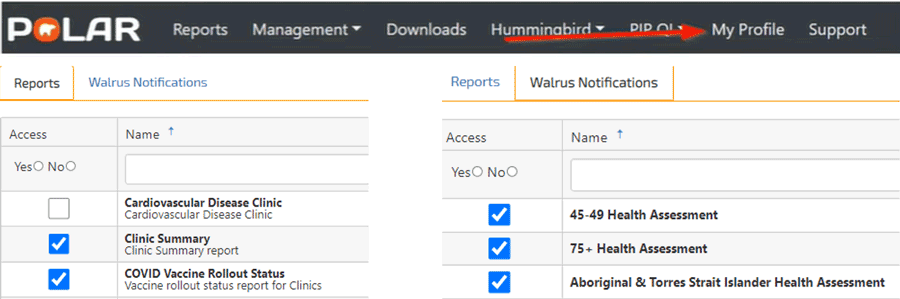
Self-permission can be checked/set by clicking on “My Profile” on the POLAR menu.             


As mentioned previously, POLAR admin is the only role which can assign roles to others and define the role’s permission and what reports can be accessed.

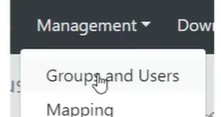
To assign roles for other users, the POLAR admin user needs to select “Groups and User” via “Management” on the POLAR menu.

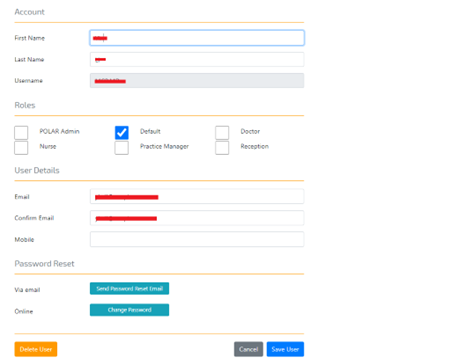
A list of POLAR users appears on the left-hand side, available reports/notifications for the role can be found on the right-hand side. Admin users can edit other user’s roles by double-clicking on the user’s name under the user account.

The admin user can then enable or disable a role/roles by ticking or unticking the box under the role section.

How to set permissions?

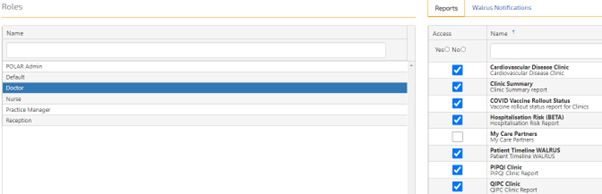
To set permission for each role, the admin user can click on “Roles” above the Reports/Walrus notification screen to define the accessibility of each role.

As mentioned before, apart from the Default role which has access to everything and cannot be altered, all other roles can be edited according to practice’s needs.

Once role permission has been defined, the accessibility reason of each report will appear by hovering at the ticked boxes.

The same logic applies to Walrus notifications.


Scenarios of setting roles and role-based permissions in general practice

Scenario 1:

SWS medical centre is one of the POLAR practices. POLAR admin user Ben has set permission for each role. For the “Doctor” role, he only sets access permission on reports A and B as they are both clinically-related.

Samantha is a newly joined GP to SWS medical centre. As Ben has preset access permission for “Doctor” after Samantha registered her POLAR account, Ben only needs to assign Samantha’s role as “Doctor”, without any other set up. Samantha will automatically have permission to view report A and B.

Scenario 2:

Outcome Health has released a new clinical report named ‘report C’.

All doctors who have  a POLAR account in the practice can access the report. Instead of ticking report C access on an individual doctor’s POLAR account, Ben simply enables report C access permission to the “Doctor” role, allowing all doctors at the clinic with a POLAR account to view report C.


How to start?

Outcome Health has developed video demonstrations and step-by-step guides to assist practices utilising these two new functions (please use your POLAR credentials to login):


Please contact your Practice Support Officer or Health Systems Improvement Officer if further support is required.


26 September 2021

The COVID-19 global health crisis has significantly affected countries worldwide since the end of 2019. A well-coordinated vaccination program is essential to facing the unprecedented challenges of the pandemic and to minimising hospitalisation and death from COVID-19.

General practices are playing a significant role in the mass vaccine rollout in Australia. According to the Australian Government Department of Health data, as of 5 August 2021, 7,007,815 Commonwealth vaccine doses had been administered in the primary care setting.

Infographic showing total vaccine doses in Australia as at 5 AUgust 2021 being 13,270,296

Resources and coordination at the general practice level will be required to achieve the goal of vaccinating eligible Australians by the end of 2021. Continuous quality improvement (CQI) in running the COVID-19 vaccine program is vital to achieving this goal and ensuring efficiency, effectiveness, consumer satisfaction, fewer vaccine safety incidents and lower resource wastage with better planning.

Actively participating in South Western Sydney PHN’s (SWSPHN) Quality Improvement In Primary Care (QIPC) program enables general practices in our region to work on their COVID-19 vaccine program as a quality improvement activity, with simple and practical guidance provided by their Practice Support Officer or Health Systems Improvement Officer.


How can QIPC assist with the COVID-19 vaccine program?

The QIPC program aims to improve the quality and efficiency of patient care in general practice by identifying areas for improvement, assisting with goal setting, and providing progress reports and feedback based on practice-based data extraction.

POLAR, the clinical audit tool, helps to utilise practice data in a meaningful manner. In early 2021, POLAR developed a COVID-19 Vaccine Planning report which is available to all eligible practices in the region, and provides an opportunity for practices to plan their COVID-19 vaccine program more effectively and efficiently.


How to make use of the COVID-19 Vaccine Planning report

Selecting a suitable patient cohort to start the vaccination program can be challenging for many practices. The COVID-19 Vaccine Planning report gives practices a quick performance overview and the characteristic of the practice population. The report has two core functions:

  • Patient cohort identification based on phases, age and chronic diseases
  • Vaccination status tracing

It enables the practice to select and focus on those patients who can benefit the most from having the vaccine first or even to chase up a patient who has overdue vaccines.


Patient cohort identification

As seen from the screenshot above, the main interface provides an overview of how your practice is progressing in the vaccine program based on each age group. The active patient count shown on top represents active patients within your practice system; patients marked inactive are not being counted. The interaction on the left-hand side has clickable buttons that enable your practice to select the patient cohort you need; hover text clarifies what each button means.

If your practice would like to focus on a specific phase, vaccine status or age group, simply click on the button, “Active Patient Count” and the number of patients in the selected patient cohort will appear.


Vaccination status tracing

The above screenshot is one of the most useful pages in this report, located under the tab “Patient Phase Details”. It provides your practice with all the information you require to view a patient’s vaccination status. All the vaccination data is based on the information within your clinical software. To enhance the report’s accuracy, it is important to keep records up-to-date even if one of the vaccines is done elsewhere.

Each description on top of the table has a magnifying icon. By clicking on that, you can filter each item down to the patient cohort you want. Once all the required filters are applied, a patient list can be generated and exported to Excel.


Examples walkthrough:

Identify patients aged between 30 to 49 years old who have not had the COVID-19 vaccine ever

Identify patients aged 60 years old and above who are overdue for a second dose of AstraZeneca vaccine


Additional information:

For a detailed explanation on this report, please refer to the POLAR webinar April 2021 and fast forward to 28:35 – 42:00 minutes, alternatively contact your support officer or email enquiries to HSIsupport@swsphn.com.au

15 June 2021

Heart failure in Australia

Heart Failure is both a costly and complex clinical syndrome that can lead to high hospital readmission rates and poor prognosis. According to ‘Snapshot of heart failure in Australia’, approximately 511,000 Australians are being affected by heart failure which attributes to 61,000 deaths per year.1

Infographic with map of Australia indicating 511,000 Australians were affected by heart failure in 2017; with 67,000 new cases; 61,000 deaths; 158,000 hospitalisations; 1.1 million days equivalent of hospital stay every year costing $3.1 billion in healthcare costs.

Reference

  1. Chen L BS, Keates AK, Stewart S. Snapshot of heart failure in Australia. Mary MacKillop Institute for Health Research. 2017.


Although there are improvements in patient care, heart failure patient mortality rates remain high, with poor prognosis. Only 50% of patients with heart failure are alive, 5 years after being diagnosed.


Infographic showing the high mortality even with treatment. Within one year of diagnosis one in five people with heart failure will die. Within five years of diagnosis, one in two people with heart failure will die.


The primary reasons for poor prognosis are mostly due to:

    • late diagnosis 
    • inadequate disease management
  • disconnected care


Early detection of heart failure and effective management allows patients to have a better and longer life and can lead to a reduction in potentially preventable hospitalisations for their chronic condition.


Why is Quality Improvement important?

General practitioners play an essential role in early detection, identifying and managing patients with heart failure. Continuously undertaking quality improvement activities enable the GP to;

  • Identify patients who are at risk of developing heart failure
  • Review the care of current patients with heart failure
  • Achieve better health outcomes for heart failure patients 
  • Reflect on practice processes for care for heart failure management and identify opportunities to improve workflow, policy, and procedures for future care


Tips and tricks for clinicians

The Quality Improvement in Primary Care program (QIPC) helps supports general practices in creating in house quality improvement activities. Utilising a Model of Improvement (MFI) and POLAR, the GP can identify high risk patients and recently diagnosed Heart failure patients to be recalled and reviewed.


POLAR logo

An example of identifying your diagnosed Heart Failure patients who are at high risk of hospitalisation in the coming 12 months in order to recall and review;

  1. Log into POLAR
  2. Navigate to Reports (top left-hand corner)
  3. Choose the “Clinical summary report”
  1. Click the tab “Clinical” then “Clinical indicators” from the dropdown box
  2. From the green “Inclusion Filters” select “Diagnosis”, then “SNOMED” and type “Cardiovascular”
  3. Click on “Risk” and under “HARP Risk” select “Urgent”
  4. To view who these patients are, click “Patient list” (top right-hand corner), then ‘Export’ to an excel spreadsheet.


NPS MedicineWise logo

NPS MedicineWise is collaborating with the National Heart Foundation of Australia and has many useful resources of Heart failure. These resources can also be used as a quality improvement activity to fulfill your PIP QI requirements.


Heart Foundation logo


National Heart Foundation of Australia also has a Smart Heart Guideline App available for the clinicians to access heart failure guidelines. 


HealthPathways logo


 Refer to Health Pathways for clinical management and treatment options for different health conditions including up-to-date cardiovascular risk assessment and heart failure management information.

If you wish to find out more about Heart Failure or SWSPHN’s QIPC program, please email: HSIsupport@swsphn.com.au

09 February 2021

Digital information can transform the quality and sustainability of health and care. Used effectively, it can help save lives, improve health and wellbeing and support a sustainable health system that delivers safe, high quality and effective health services for all Australians.

As you may know, SWSPHN plays an important role in supporting quality improvement (QI) in general practices across our region with strategies to embed QI systems, improve data quality, analyse the practice’s data and identify areas for improvement, assist with goal setting and improvement activities, provide progress reports and feedback.


This month we take a closer look at our Quality Improvment in Primary Care program


SWSPHN’s Quality Improvement in Primary Care (QIPC) program has continued to grow since it began more than three years ago with 245 practices from the 425 practices in South Western Sydney participating in the program.

The three aims of the QIPC program are: improving data quality; utilising practice data to improve patient care; and identifying potential business revenue for the practice.

A key component of the program is the collection of a practice’s deidentified dataset which is then used to create both a benchmark report and clinical area of focus reports for our practices. To find out more about data security

We currently have the following clinical area of focus reports, diabetes, chronic kidney disease, cardiovascular disease, COPD, asthma, depression, anxiety, bipolar and schizophrenia.

The QIPC program has three tiers that indicate the practice’s level of engagement in quality improvement – as engagement increases, practices move into higher tiers and receive different reports.

From the 245 QIPC participating practices – nine practices are participating in Tier 1 (data sharing only), 177 in Tier 2 (data quality) and 59 in Tier 3 (clinical focus).

QIPC reports are created monthly and delivered quarterly to all participating practices. The practice uses this report to identify an area they would like to work on and SWSPHN records this on a model for improvement (MFI) template. This MFI is then reviewed the following visit to track the practice’s progress and to re-identify a new focus area to target for the following quarter.


What are the benefits of participation?

Benefits include:

  • 40 Category 1 RACGP and ACRRM points and for general practitioners participating in Tier 3
  • Enhance data management to meet accreditation standards
  • Improve patient care while identifying potential business revenue
  • Establish sustainable systems and processes for the practice
  • Links to referral pathways


Who is eligible to participate?

All practices in South Western Sydney are eligible to participate if they are a computerised practice and sign SWSPHN’s Data Sharing and License Agreement. To find out more about these requirements, contact your Practice Support Officer on 4632 3000.


What do participants have to say about the program?

Dr Indran Rajendra, Bundanoon: “The focus of the QIPC program is data cleansing, which I am a big advocate for. I believe once in the right frame of mind, improving database quality and completeness easily integrates into the daily use of your medical software. Once improved, the database becomes a jewel in your crown resulting in better health and financial outcomes for the practice. As this program has strong focus towards attaining clean data I can only highly recommend all practices, if eligible, to also participate.”

Dr Dilruni Pallewatta, Liverpool: “The QI program from PHN has immensely helped me to improve my data quality and patient management especially in regard to diabetes. I myself have learned a lot and greatly advise other practices to join this program.” 

To find out more about the QIPC program visit our webpage or contact your PSO on 4632 3000.

29 May 2020

We are transitioning away from the clinical audit tool, Pen CS, to the new POLAR GP tool.

The switch to POLAR GP from 1 July 2020 aims to better support practices in understanding their patient cohort. It will provide meaningful analysis to identify gaps in patient care, track patient outcomes, build on areas of quality improvement and identify opportunities to improve practice revenue.

This data tool is also used to help practices qualify for the PIP QI incentive.

Some of the key benefits of the POLAR GP tool are:

  • one install per practice
  • remote access to the tool
  • user friendliness
  • live data
  • advanced data mapping
  • advanced filter options
  • regular PIP QI reports for each practice
  • new reports coming on board including a COVID-19 report.

POLAR GP will be 100 per cent subsidised by SWSPHN and there will be no direct or ongoing costs to the practice.

All general practices currently participating in the PIP QI have previously signed a Data Sharing and License Agreement with SWSPHN for the use of the previous PenCS tool. Due to the transition to POLAR GP, a new software vendor, a contract variation will need to be signed prior to the installation of your POLAR GP tool.

Your PHN representative will be in contact with your practice shortly to provide more information. If you have any concerns about making this transition, please do not hesitate to contact: HSIsupport@swsphn.com.au

If you wish to know more about POLAR GP, please visit: PolarOutcome Healthour website.